Ungodly EDF: World Brothers
Seven native C++ mods for EARTH DEFENSE FORCE: WORLD BROTHERS on the stable UE4SS v3.0.1, sharing one in-game menu. More Invaders, smarter Invaders, real voxel destruction, instant hitscan, input buffering, Beautify, and subtitles that finish in time.
By StixsworldHD (StixsmasterHD4k). Free download, collection version 1.
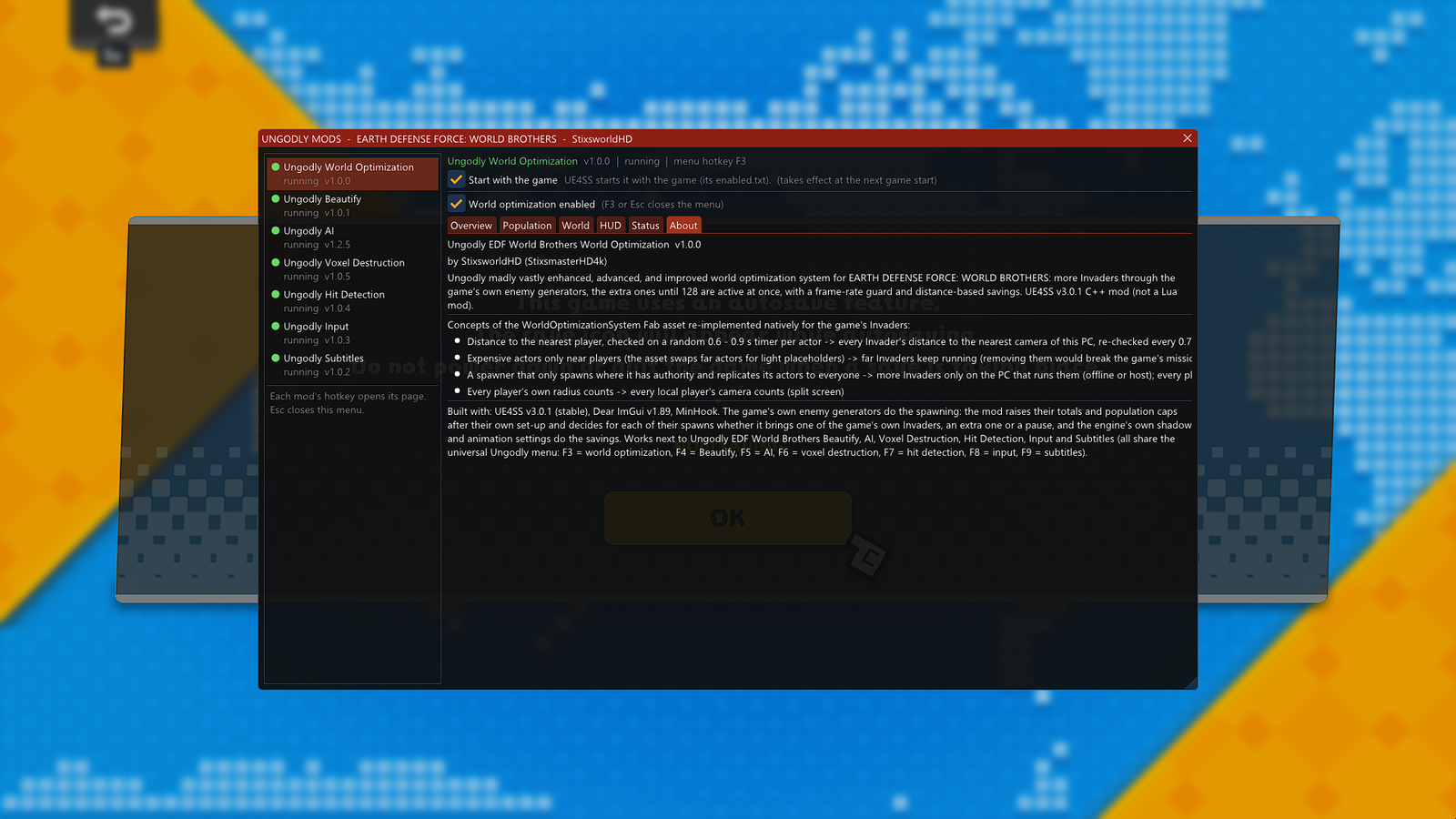
Each mod's hotkey opens its page. Esc closes this menu.
Ungodly World Optimization v1.0.0 | running | menu hotkey F3
Start with the game UE4SS starts it with the game (mods.txt and its enabled.txt).
Ungodly EDF World Brothers World Optimization v1.0.0 by StixsworldHD (StixsmasterHD4k). More Invaders through the game's own enemy generators, the extra ones until 128 are active at once, with a frame-rate guard and distance-based savings.
In game: F3 opens this page, Esc closes the menu. All World Optimization features
Ungodly Beautify v1.0.1 | running | menu hotkey F4
Start with the game UE4SS starts it with the game (mods.txt and its enabled.txt).
Ungodly EDF World Brothers Beautify v1.0.1 by StixsworldHD (StixsmasterHD4k). Beautify's depth-aware sharpening, vibrance, hard light, contrast, brightness, vignette, dithering and colour-vision aid on the game's finished 3D picture, right before the game draws its HUD and menus. F2 switches it on and off.
In game: F4 opens this page, F2 switches Beautify on and off, Esc closes the menu. All Beautify features
Ungodly AI v1.2.5 | running | menu hotkey F5
Start with the game UE4SS starts it with the game (mods.txt and its enabled.txt).
Ungodly EDF World Brothers AI v1.2.5 by StixsworldHD (StixsmasterHD4k). Enemy AI, combat AI, pathfinding, neural networks and a projectile missile system: squads and roles, perception and memory, fair-fight rules, six learning brains and missiles you can shoot out of the air.
In game: F5 opens this page, Esc closes the menu. All AI features
Ungodly Voxel Destruction v1.0.5 | running | menu hotkey F6
Start with the game UE4SS starts it with the game (mods.txt and its enabled.txt).
Ungodly EDF World Brothers Voxel Destruction v1.0.5 by StixsworldHD (StixsmasterHD4k). Blast craters, structural integrity, collapse rules, physics chunks, coloured bursts, chain reactions, more rubble, prop tuning and a live HUD.
In game: F6 opens this page, Esc closes the menu. All Voxel Destruction features
Ungodly Hit Detection v1.0.4 | running | menu hotkey F7
Start with the game UE4SS starts it with the game (mods.txt and its enabled.txt).
Ungodly EDF World Brothers Hit Detection v1.0.4 by StixsworldHD (StixsmasterHD4k). Hitboxes, hit detection and hitscanning: instant hitscan, bigger bullets and thicker rays, damage zones, penetration, shots that pass through allies, hitmarkers and damage numbers.
In game: F7 opens this page, Esc closes the menu. All Hit Detection features
Ungodly Input v1.0.3 | running | menu hotkey F8
Start with the game UE4SS starts it with the game (mods.txt and its enabled.txt).
Ungodly EDF World Brothers Input v1.0.3 by StixsworldHD (StixsmasterHD4k). Input handling and input buffering: presses the game would throw away are kept and handed to the game the moment it can act on them, plus stick shaping, trigger points, raw mouse, toggle aim and an input display.
In game: F8 opens this page, Esc closes the menu. All Input features
Ungodly Subtitles v1.0.2 | running | menu hotkey F9
Start with the game UE4SS starts it with the game (mods.txt and its enabled.txt).
Ungodly EDF World Brothers Subtitles v1.0.2 by StixsworldHD (StixsmasterHD4k). Every subtitle line is spelled out in time, in every language; the game's subtitle can be made bigger, raised or faded; an optional subtitle box and a backlog of the last lines.
In game: F9 opens this page, Esc closes the menu. All Subtitles features
Install in three steps
The mods run on UE4SS, a free mod loader for Unreal Engine games. You install it once, then copy one folder from the download.
-
Install UE4SS v3.0.1
Download the official UE4SS v3.0.1 from GitHub and put its files next to
Part 1: Install UE4SSEDFWB-Win64-Shipping.exe. -
Copy the Mods folder
Copy the
Part 2: Install the modsModsfolder from the mod download into the sameWin64folder. -
Start the game, press F3
Check
The first-launch checkUE4SS.logfor the seven mods, then open the universal menu in game.
One menu for all seven
Every mod has its own hotkey, and every hotkey opens the same window on that mod's page: F3 World Optimization, F4 Beautify, F5 AI, F6 Voxel Destruction, F7 Hit Detection, F8 Input and F9 Subtitles. Esc closes it.
The list on the left shows every Ungodly mod with a coloured dot: green when it's running, amber when it's installed but switched off, grey when it isn't installed. Each page has a Start with the game switch that decides whether UE4SS starts that mod the next time you play.
While the menu is open, your mouse and keyboard go to the menu, so your camera and character stay put. A controller still reaches the game, so pause first if you play with a pad.
The seven mods
Each one works on its own, and all seven work together. Every option is in the in-game menu and in a documented settings file, with presets to start from.
- F3 Ungodly World OptimizationMore Invaders from the game's own enemy generators, until 128 are active at once. v1.0.0
- F4 Ungodly BeautifySharper, livelier 3D picture. The HUD, menus and subtitles stay untouched. v1.0.1
- F5 Ungodly AIInvaders that fight like an army: squads, flanking, learning, smarter missiles. v1.2.5
- F6 Ungodly Voxel DestructionCraters, collapsing floors, chain reactions and rubble that falls as real pieces. v1.0.5
- F7 Ungodly Hit DetectionInstant hitscan, bigger hitboxes for your shots, headshots, penetration, hitmarkers. v1.0.4
- F8 Ungodly InputInput buffering, your own stick dead zones and trigger points, raw mouse. v1.0.3
- F9 Ungodly SubtitlesEvery subtitle line spelled out in time, in every language, plus a backlog. v1.0.2
What you need
- Windows 10 or 11, 64-bit.
- EARTH DEFENSE FORCE: WORLD BROTHERS on Steam.
- The latest Microsoft Visual C++ Redistributable (x64).
- UE4SS v3.0.1, free from its official GitHub release.
- DirectX 11, the game's default, for the in-game menu, Beautify and the mods' on-screen extras.
- A way to open .rar files: an up-to-date Windows 11, or the free 7-Zip.
- A mouse and keyboard to use the menu.
Download version 1
One 3.3 MB archive with all seven mods, UE4SS's own standard mods and a read-me for every mod. UE4SS itself comes from its official GitHub page; part 1 of the guide walks you through it.
My download mirrors are on my own paid Google Drive account, so I can guarantee they're safe and secure. They may also give you faster download speeds.
StixsworldHD