Part 1 of 2
Install UE4SS v3.0.1
UE4SS (the Unreal Engine 4/5 Scripting System) loads mods into Unreal Engine games. The Ungodly mods are C++ mods built for one exact version of it: the stable UE4SS v3.0.1. This page installs it into EARTH DEFENSE FORCE: WORLD BROTHERS. Tick each step off as you go; this browser remembers where you are.
Step 1: Check what you need
- Windows 10 or 11, 64-bit.
- EARTH DEFENSE FORCE: WORLD BROTHERS installed through Steam and up to date.
- The game closed.
- Already have a UE4SS in this game? Read Already have UE4SS? first.
Step 2: Install the Visual C++ Redistributable (x64)
UE4SS and the mods are built with Microsoft's C++ compiler and need its runtime files. UE4SS.dll needs two of them, MSVCP140_ATOMIC_WAIT.dll and VCRUNTIME140_1.dll, that only recent versions of the redistributable install, so update it even if you already have one.
- Download the installer from Microsoft:
vc_redist.x64.exe. Microsoft calls it the Visual C++ v14 Redistributable. - Run it and click Install.
- If it offers Repair, or says a newer version is already installed, you already have it. Close the window.
- If it asks you to restart Windows, restart.
Get the x64 version: the game, UE4SS and all seven mods are 64-bit. Checked in the files themselves: UE4SS.dll imports MSVCP140.dll, MSVCP140_ATOMIC_WAIT.dll, VCRUNTIME140.dll and VCRUNTIME140_1.dll; every Ungodly main.dll imports MSVCP140.dll and VCRUNTIME140.dll.
Step 3: Download UE4SS v3.0.1
- Open the UE4SS v3.0.1 release on GitHub. On 11 Oct 2026 it was marked Latest, the newest stable UE4SS. If GitHub ever shows a newer stable release, still use v3.0.1: the mods are built for it.
- Scroll down to Assets and click UE4SS_v3.0.1.zip (5.3 MB).
- Save it, for example in your Downloads folder.
The same release page lists more files. You don't need any of them:
| File | What it is |
|---|---|
zDEV-UE4SS_v3.0.1.zip | The developer build: extra files, and its console windows are shown by default. |
zCustomGameConfigs.zip | Fixes for a list of other games. EDF: World Brothers is not on it and needs none. |
zMapGenBP.zip | Unreal Editor files for mod developers. |
Source code (zip / tar.gz) | The source code, not something you can install. |
Step 4: Check the download Optional
A SHA-256 checksum proves your file is byte-for-byte the official one. It takes a minute.
- Right-click the Start button and open Terminal (Windows 11) or Windows PowerShell (Windows 10).
- Paste this and press Enter (change the path if you saved the zip somewhere else):
PowerShell
Get-FileHash "$env:USERPROFILE\Downloads\UE4SS_v3.0.1.zip" -Algorithm SHA256 - Compare the Hash it prints with this one. PowerShell prints capital letters; that makes no difference.
SHA-256
4B47D4BCEDDD2F561A4E395BFA00924CCFC945AF576A2D0C613E6537846C57EC
Using the old Command Prompt instead? certutil -hashfile "%USERPROFILE%\Downloads\UE4SS_v3.0.1.zip" SHA256 prints the same hash in small letters.
Step 5: Open the game's Win64 folder
- In Steam, open your Library.
- Right-click EARTH DEFENSE FORCE: WORLD BROTHERS, then choose Manage and Browse local files. File Explorer opens the game's install folder. Steam names it
mikan. - Open EDFWB, then Binaries, then Win64.
You're in the right folder when you can see EDFWB-Win64-Shipping.exe, the game itself. On most PCs the full path is one of these; you can paste it into File Explorer's address bar:
C:\Program Files (x86)\Steam\steamapps\common\mikan\EDFWB\Binaries\Win64F:\SteamLibrary\steamapps\common\mikan\EDFWB\Binaries\Win64Step 6: Copy UE4SS into Win64
- Double-click
UE4SS_v3.0.1.zipto open it in File Explorer. Inside are six items: theModsfolder,Changelog.md,dwmapi.dll,README.md,UE4SS-settings.iniandUE4SS.dll. - Select all six with Ctrl + A and copy them with Ctrl + C.
- Go to the
Win64folder from step 5 and paste with Ctrl + V. - If Windows asks for administrator permission (it does when the game is under
Program Files), click Continue.
Step 7: Check the folder
Your Win64 folder should now look like this:
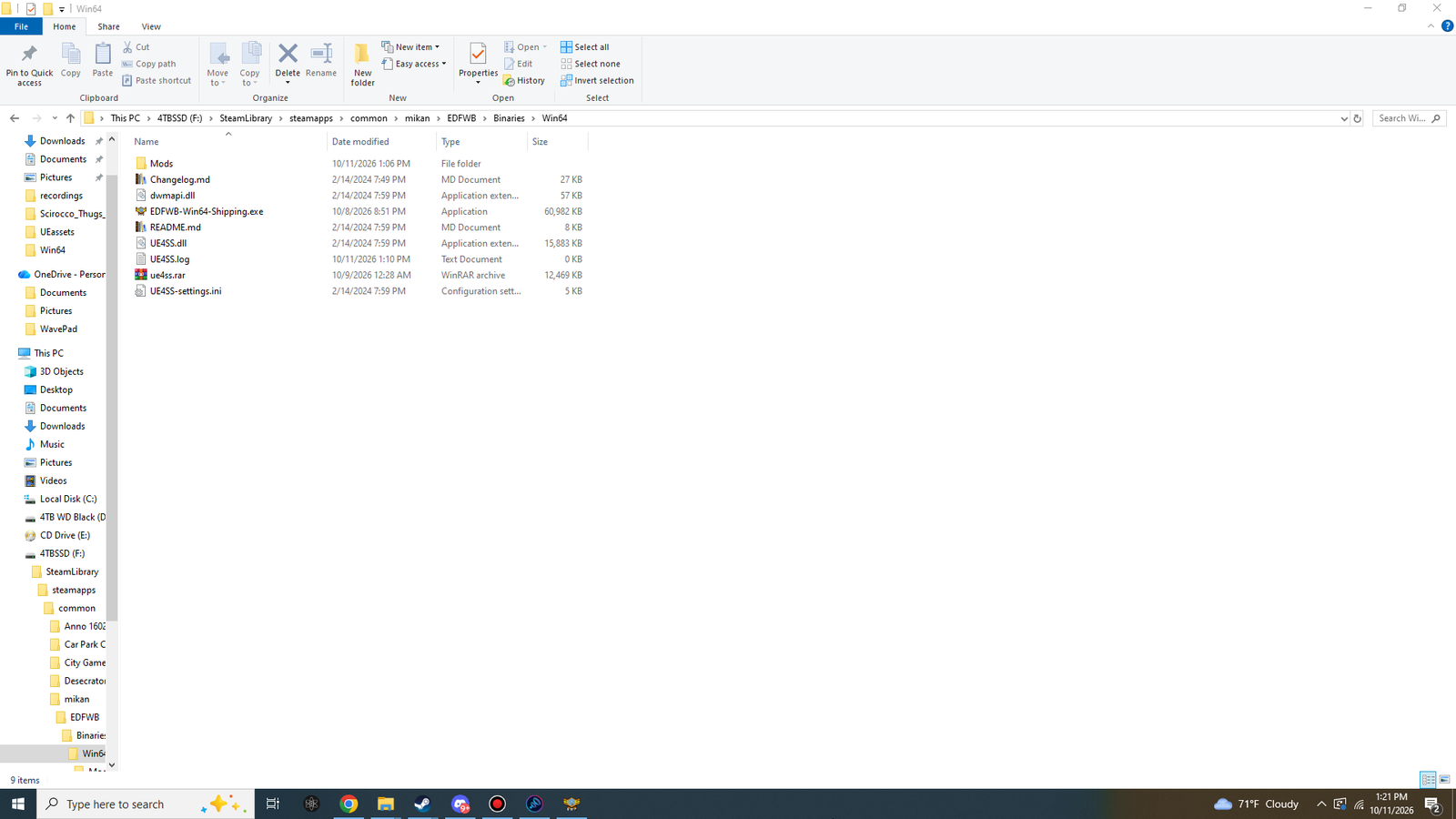
| Name | Size in File Explorer | What it is |
|---|---|---|
Mods | folder | UE4SS's mods folder. It holds UE4SS's own small mods and mods.txt, the list of mods to start. The Ungodly mods go in here in part 2. |
Changelog.md | 27 KB | UE4SS's list of changes. Not needed to play. |
dwmapi.dll | 57 KB | The loader. Windows looks for a DLL with this name in the game's own folder first, so the game loads it at start, and it starts UE4SS.dll. |
README.md | 8 KB | UE4SS's own read-me. Not needed to play. |
UE4SS-settings.ini | 5 KB | UE4SS's settings. The defaults are right for these mods. |
UE4SS.dll | 15,883 KB | UE4SS itself: it finds its way around the game's engine and starts the mods. |
EDFWB-Win64-Shipping.exe | already there | The game. Leave it as it is. |
UE4SS.log | after step 8 | UE4SS's log. It's written fresh every time the game starts. |
The screenshot also shows ue4ss.rar. That's a backup on StixsworldHD's PC; you don't need it. The sizes in the table were measured from the official zip and match the screenshot.
Step 8: Start the game once
This tells you UE4SS works before you add the mods.
- Start the game from Steam as usual and wait for the title screen.
- Quit the game.
- Open
Win64\UE4SS.logwith Notepad.
| Look for | It means |
|---|---|
UE4SS - v3.0.1 … - Git SHA #d935b5b near the top | The stable UE4SS v3.0.1 is running. |
Starting mods (from mods.txt load order)... | UE4SS is reading its Mods folder. |
No UE4SS.log at all? Then UE4SS didn't start. See No UE4SS.log after starting the game.
UE4SS settings
UE4SS-settings.ini is right for the Ungodly mods as it comes. Leave it as it is. These are the lines people ask about, under [Debug]:
| Setting | Default | What it does |
|---|---|---|
GuiConsoleEnabled | 1 | Lets Ctrl + O open the UE4SS window. Every Ungodly mod also has a tab there, which is how you reach their options on DirectX 12. Keep it at 1. |
GuiConsoleVisible | 0 | When 1, the UE4SS window opens by itself at every start. |
ConsoleEnabled | 0 | When 1, an extra text console window opens next to the game. |
GraphicsAPI | opengl | What draws the UE4SS window: dx11, d3d11 or opengl. |
Read from the UE4SS-settings.ini inside the official UE4SS_v3.0.1.zip. EARTH DEFENSE FORCE: WORLD BROTHERS isn't on UE4SS's list of games that need a custom configuration (zCustomGameConfigs.zip), so there's nothing else to add.
Already have UE4SS?
Look in your Win64 folder:
| You see | You have | Do this |
|---|---|---|
dwmapi.dll and UE4SS.dll directly in Win64, and UE4SS.log shows UE4SS - v3.0.1 … Git SHA #d935b5b near the top | The stable v3.0.1 | Nothing. Go to part 2. |
dwmapi.dll plus a ue4ss folder with UE4SS.dll, UE4SS-settings.ini and Mods inside | An experimental build | Move dwmapi.dll and the whole ue4ss folder out of the game folder (keep them as a backup), then follow this page from step 3. |
UE4SS files, but UE4SS.log names another version | Another version | Move its files out of the game folder (keep them as a backup), then follow this page from step 3. |
The experimental layout above was checked in the current experimental download, UE4SS_v3.0.1-1125-g527a483b.zip. To go back to an experimental build later, swap the backups the other way round.
Remove UE4SS
- Switch it off for a while: move
dwmapi.dllout ofWin64. Without it, the game doesn't load UE4SS or any of the mods. Put it back to switch everything on again. - Remove it completely: delete
dwmapi.dll,UE4SS.dll,UE4SS-settings.ini,UE4SS.log,README.md,Changelog.mdand, if you have no other UE4SS mods, theModsfolder fromWin64. LeaveEDFWB-Win64-Shipping.exeand everything else alone.